

Financial services firms face a familiar tension: improving productivity without compromising confidentiality, governance, or oversight — or the ability to demonstrate and audit how work is handled.
Many firms use Microsoft 365 Copilot to reduce their manual work across meetings, documentation, and internal coordination. By November 2024, nearly 70% of Fortune 500 companies were already using Microsoft 365 Copilot. Additionally, for every $1 invested in generative AI, companies saw an average return of $3.70, with some reporting returns as high as $10.
For financial services firms, the more important question is whether Copilot can support internal productivity while maintaining data security, access governance, recordkeeping, and a clear audit trail.

The Compliance–Efficiency Challenge
Organizations today contend with an expanding landscape of regulations, data protection expectations, and internal governance requirements. Ensuring compliance still demands substantial manual effort — from documenting procedures to reviewing communications to preparing internal summaries and audit support materials.
That burden drains staff time and slows down work that still requires human judgment. Older benchmark studies have estimated annual compliance costs at up to $5.47 million, while the average cost of non-compliance has been estimated at $14.82 million. At the same time, many compliance professionals say new technologies such as AI can make it easier to meet compliance standards.
For financial services firms, this challenge shows up in practical ways:
- too much time spent summarizing meetings and next steps
- repetitive drafting of internal reports, policy updates, and review memos
- heavy coordination across compliance, operations, finance, and technology
- pressure to move faster without losing control of sensitive information
This is where Microsoft 365 Copilot becomes worth evaluating.
Microsoft 365 Copilot: AI-Powered Productivity with Compliance in Mind
Microsoft 365 Copilot is embedded across Outlook, Teams, Word, Excel, and other Microsoft apps. It uses large language models together with organizational Microsoft Graph data to generate context-aware responses and assist with work already happening inside Microsoft 365.
That matters for regulated firms because Microsoft positions Copilot differently from public AI tools. According to Microsoft documentation:
- prompts and responses remain within the Microsoft 365 service boundary
- Copilot respects existing user permissions
- prompts, responses, and organizational data are not used to train the underlying foundation models for Microsoft 365 Copilot
- organizations can use Microsoft Purview to support auditing, retention, and additional compliance controls for Copilot-related activity
That gives financial services firms a more credible foundation for adoption. But it’s only a foundation. Firms still need to ensure that the work Copilot supports remains traceable, reviewable, and aligned with internal governance standards.
Copilot inherits the permissions and access structures already in place. If SharePoint, Teams, OneDrive, and Exchange permissions are too broad, Copilot can make those weaknesses easier to feel because it helps users retrieve and synthesize information faster. In other words: Copilot can support compliance-minded productivity — but only if the underlying Microsoft 365 environment is already governed with discipline.
Real-World Gains: Copilot in Controlled Workflows
Early adopters have reported meaningful improvements in efficiency and documentation-heavy workflows after implementing Microsoft 365 Copilot.
A few examples are especially relevant:
- British Columbia Investment Management Corp (BCI) used Microsoft 365 Copilot alongside Azure AI services to automate manual work in regulated finance operations. The firm reported 10–20% productivity gains for 84% of users, 68% higher employee satisfaction, more than 2,300 hours saved, and a 30% reduction in time spent writing internal audit reports.
- XP Inc. used Copilot in its audit function to handle repetitive data compilation and reporting, saving more than 9,000 hours and increasing audit-team efficiency by 30%.
- Eaton used Copilot to generate 1,000 standard operating procedures, significantly reducing the time required to produce and update process documentation.
These gains show where AI delivers the most value on workflows where documentation, review, and traceability already matter.
For financial services firms, that typically means work that is:
- internal
- documentation-heavy
- repetitive
- review-oriented
- time-consuming but not judgment-free
Ensuring Secure and Compliant Deployment
Deployment still needs to be deliberate.
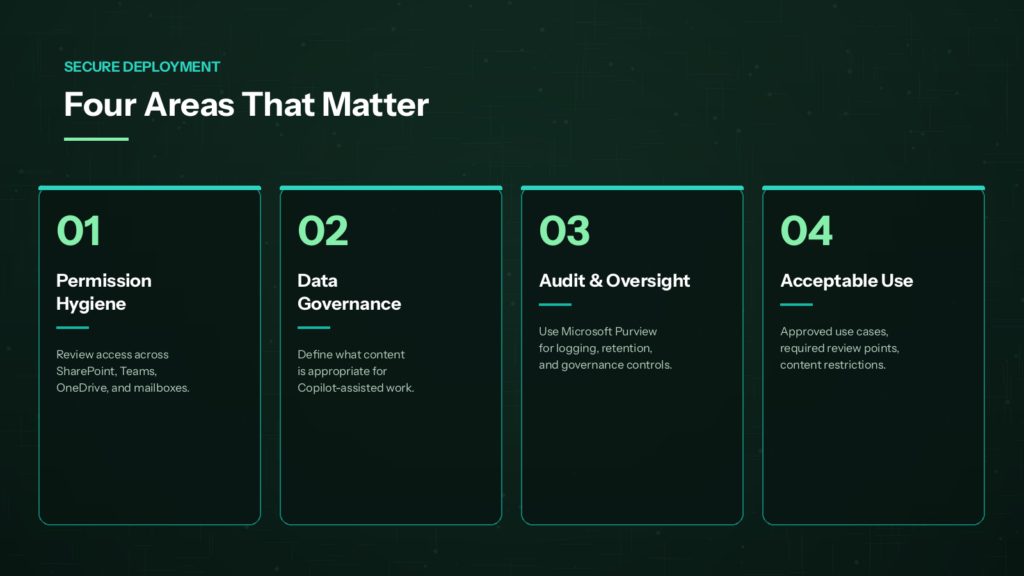
For financial services firms, a secure rollout should focus on four areas:
1. Permission hygiene
Review access across Sharepoint, Teams, OneDrive, mailboxes, and groups. Copilot only shows users information they already have access to, which is effective only if permissions are well governed.
2. Data governance
Define what kinds of information are appropriate for Copilot-assisted workflows, and set clear boundaries around higher-sensitivity content such as client records, investor materials, and internal financial data.
3. Audit, retention, and oversight
Use tools like Microsoft Purview to support audit logging, retention, and governance controls. AI adoption must fit into existing expectations for review, audit, and recordkeeping — and maintain clear records of how work is generated, reviewed, and retained.
4. Acceptable use
Define approved internal use cases, required review points, and content restrictions. This keeps AI-assisted work consistent, reviewable, and appropriate for regulated environments.
Where Copilot Can Add Value First
For financial services firms, the most practical starting point is internal, documentation-heavy work.
That often includes:
- summarizing internal meetings
- capturing decisions and follow-up actions
- consolidating feedback across documents
- preparing briefing notes
- helping cross-functional teams align across compliance, operations, finance, and technology
These aren’t flashy use cases. They’re the workflows that reduce administrative drag while preserving documentation, review, and control.
What Firms Gain
Early gains tend to show up in four areas:
- stronger meeting follow-up
- faster document drafting
- smoother cross-functional coordination
- more time for analysis, review, and decision-making
For financial services firms, that translates into less friction and more capacity for work that still requires human oversight.
Lessons Learned and Best Practices
- Start with targeted rollouts
- Train users on secure usage
- Monitor patterns and logs, and refine access regularly
- Prioritize high-value workflows
- Treat governance as part of rollout
- Ensure outputs remain reviewable and attributable
These practices make gains more sustainable — and more defensible.
Taking the Next Steps
For financial services firms, broad, unstructured AI adoption is never the goal. A controlled rollout built around a small set of high-value workflows is.
Start by assessing:
- whether Microsoft 365 permissions are ready
- which use cases come first
- how governance and acceptable use will be defined
- what audit, retention, and oversight expectations need to be met
Microsoft 365 Copilot can deliver real value in regulated environments — but only when introduced in a way that improves productivity while preserving security, control, and clear, reviewable records of how work is done.